
Insytful monthly roundup: September 2026

TL;DR [too long; didn't read] 🤯
- Keep work moving: assign tasks to your team and track progress.
- Spot new content fast: quickly see what's been added recently and check how it scores before quality issues arise.
- Get more control over your site: decide how Insytful scans your site, what gets included and what AI Search can use.
- Spend less time finding problems: jump straight to the page element that triggered a policy.
- Get more from AI search: get more relevant answers for your sector, plus clearer insight into how people are using it.
We had great plans to send out the August update, but got caught up with a busy couple of weeks of summer heat, holidays, tenders and new features. So now you have a double dose of Insytful goodness in one update!
In the September update
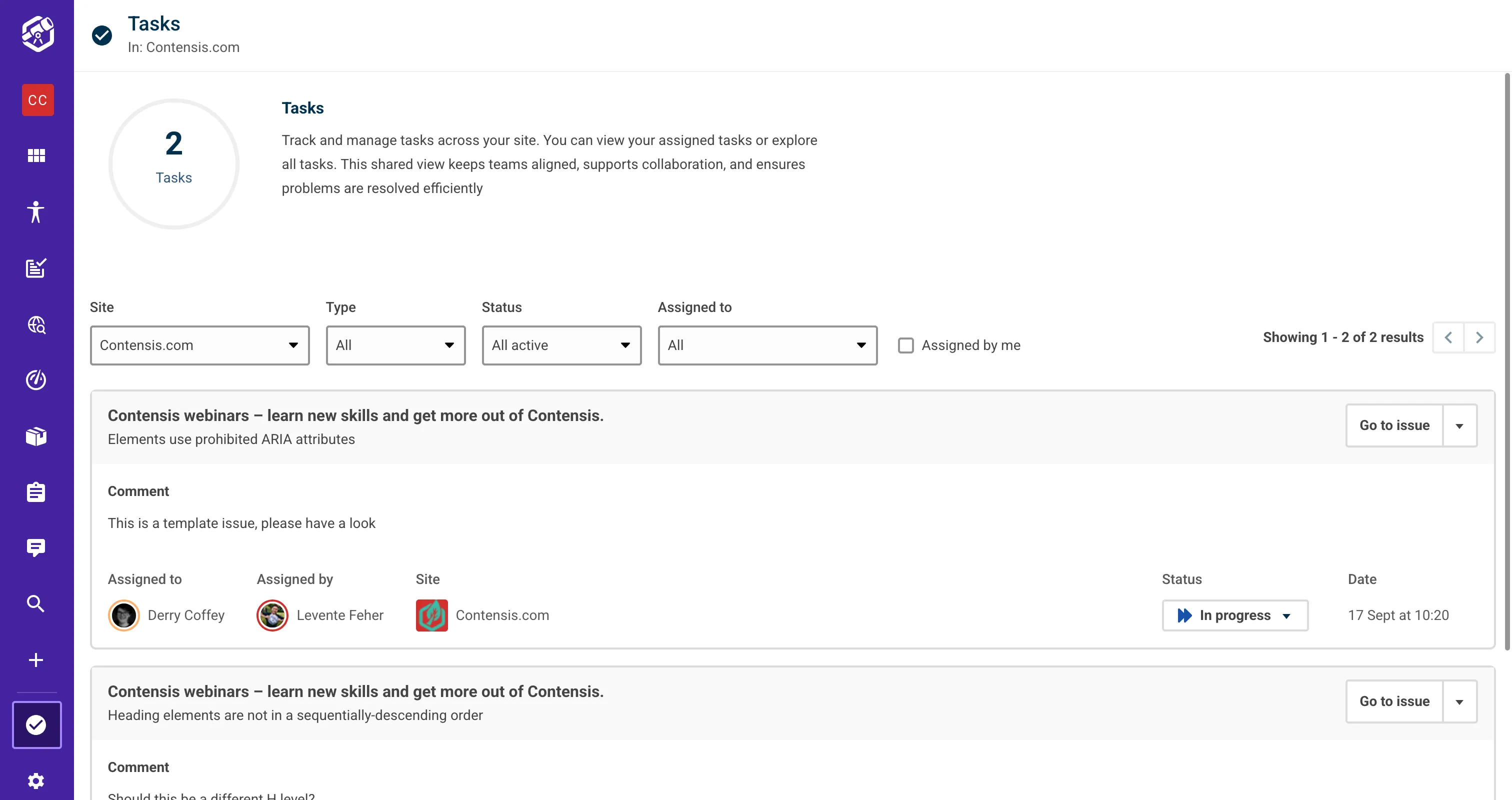
Assigned issues are now tasks
Assigned issues had a re-brand in August. They're now called Tasks to better reflect what the feature can do, with support going beyond accessibility and performance issues.
Track Tasks from 'to do' to 'done' ✅
Insytful users can now assign misspellings and broken links to other users. Policies and others tasks are coming soon. We've also introduced statuses for tasks to help teams collaborate, users can now mark a task as: To do, In progress or Done. Some other tweaks to Tasks include:
- Tasks have their own home. In the navigation bar, Tasks now sit at the bottom left.
- Filter and scan at a glance. You can filter tasks by site, status and type. Each type has its own icon for visibility at a glance, and accessibility tasks show their WCAG conformance level, so it's easy to see which ones to tackle first.
- Tasks moved to done move out of the way. Completed tasks leave your active list but stay one filter away, so you keep a record of what's been fixed.
- Notification emails make sure assignees hear about it. When you assign or reassign a task, the assignee gets a newly designed email notification that tells them what it is and where to find it. Everyone's favourite 😮💨
The Insytful team putting features into action
We knew renaming every mention of assigned issues on the website to tasks wasn't going to be easy, but we knew there was a tool for that. To help with rebranding process, we used Insytful. If you're in a similar position, here's how we did it.
We set up a policy to show all pages on our site that mentioned "assigned issues" and updated them one by one. We asked AI Search on the Insytful website to show us any mention of assigned issues as a second check.
Find newly published pages in Insytful
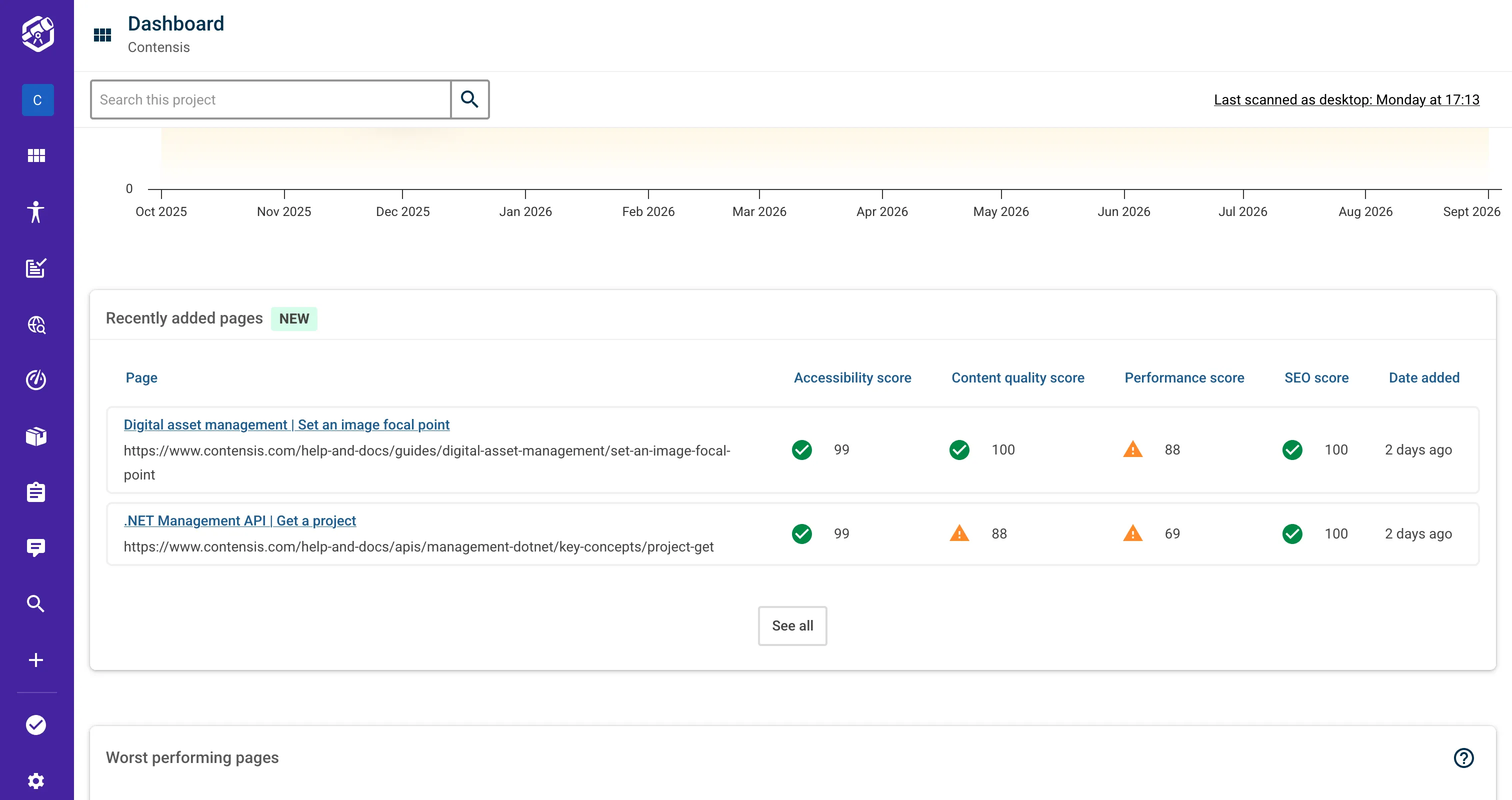
New pages are the ones most likely to need a second look, and now they are highlighted for you in the app. Any page added since your previous full scan gets a New badge, and you can filter page lists to show only recently added pages as well.
Your dashboard also has a new Recently added pages card showing each new page and its category scores, so you can review newly published content without hunting for it.
More control over your Insytful site scan
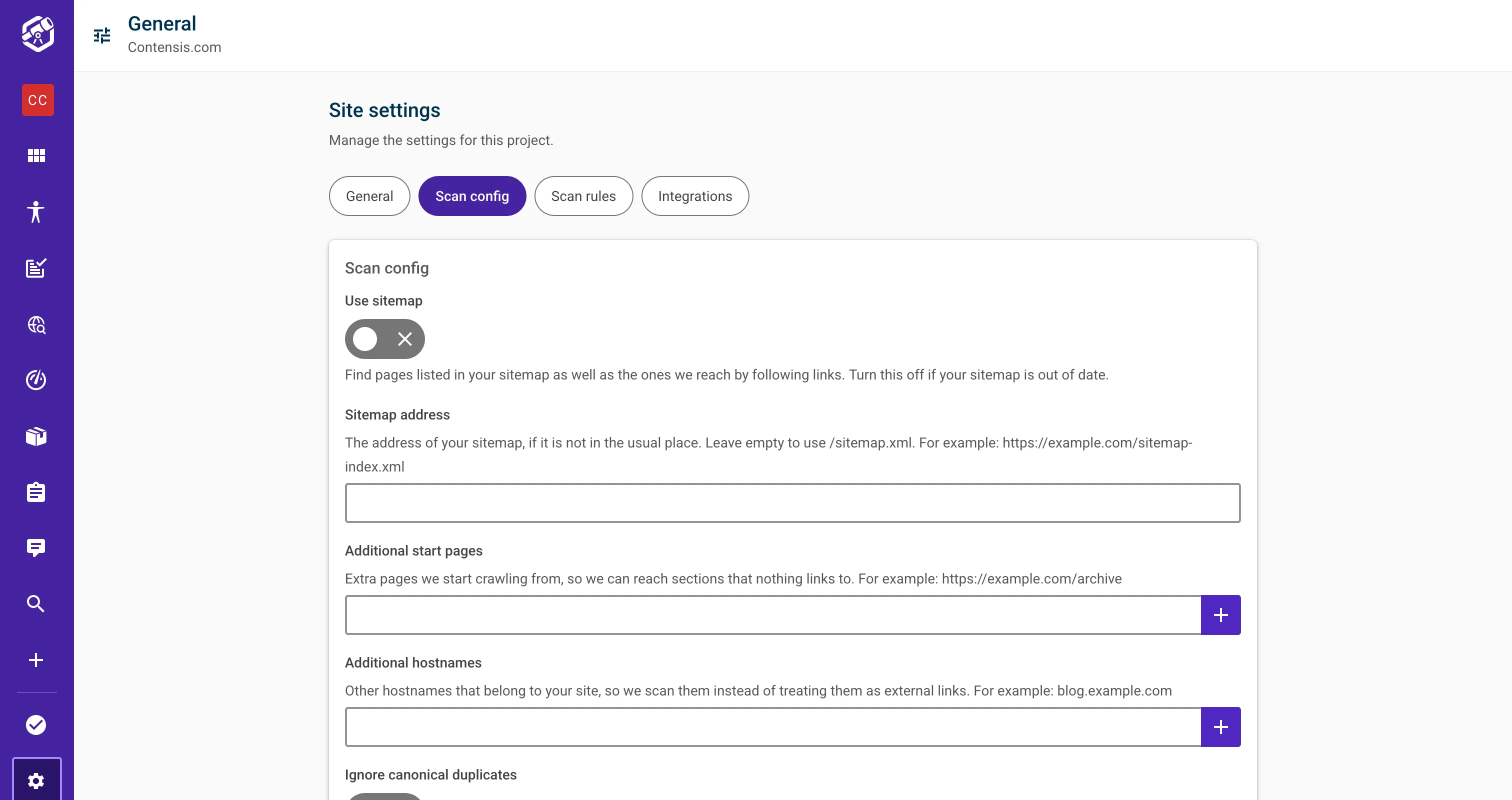
We've rebuilt the site settings pages to provide greater control over your site. The site settings area is now split into a card layout with two new tabs scan config and scan rules, in addition to general settings and integrations. We've also moved a lot of options that used to need a support request into the app, a feature that had been in our backlog for a while!
New: Scan Config tab in site settings
A new Scan config tab lets you:
- Use your sitemap, or don't. Turn sitemap discovery on or off, for example if your sitemap is out of date. You can also point us at a sitemap that isn't at the usual
/sitemap.xmladdress. We now follow sitemap indexes too, including Gzipped child sitemaps, so sites that split their sitemap across several files are covered in full. - Ignore canonical duplicates. Choose whether pages pointing to another canonical URL are excluded from your reports and scores, helping you avoid duplicate content skewing your results. It's especially useful if you are not using Contensis and your CMS doesn't allow short URL redirects, so you are forced to have your page in multiple locations.
- Tune your spellcheck. The abbreviation and UK postcode options we introduced in July now have their own controls, so you can switch them on yourself. More options are coming soon.
- Add start pages and hostnames so we can reach parts of your site that links alone don't lead to.
New: Scan rules tab in site settings
A new Scan rules page lets you:
- Choose which parts of your site we scan. Add rules for the paths you want Insytful to scan and the ones you want it to skip, giving you more control over what appears in your reports.
- Control what AI Search can use. If you use Insytful AI search, you can separately choose which paths it indexes and which it leaves out. This means a page can still appear in your quality reports without being used in AI search answers. It's useful for third-party or user generated content, such as student blog posts or external data feeds, that you want to monitor but don't want included in search.
Site administrators can manage Scan rules.
Other site settings improvements:
- Check whether a page is in your sitemap. In July, we promised an in-app view of sitemap coverage. The SEO tab on each page now shows whether that page appears in your sitemap, making it easier to spot pages that may have been missed.
- Avoid losing unsaved changes. Settings screens now warn you if you try to leave before saving your changes.
See exactly where a content policy matched
Content policies have been updated and are much more precise now. When a policy finds an issue, you can now see exactly where it found it.
You can write rules that match specific elements and their attributes, for example a link pointing to a particular domain or an image missing a certain attribute. Every match now records which element triggered it giving you more accurate highlighting in the UI.
You'll see this on the new Policies tab on each page. It lists every policy the page matched with the rule details, and clicking an occurrence highlights the element on the page preview. Policy occurrences in your site-wide reports link straight to that tab for easy navigation.
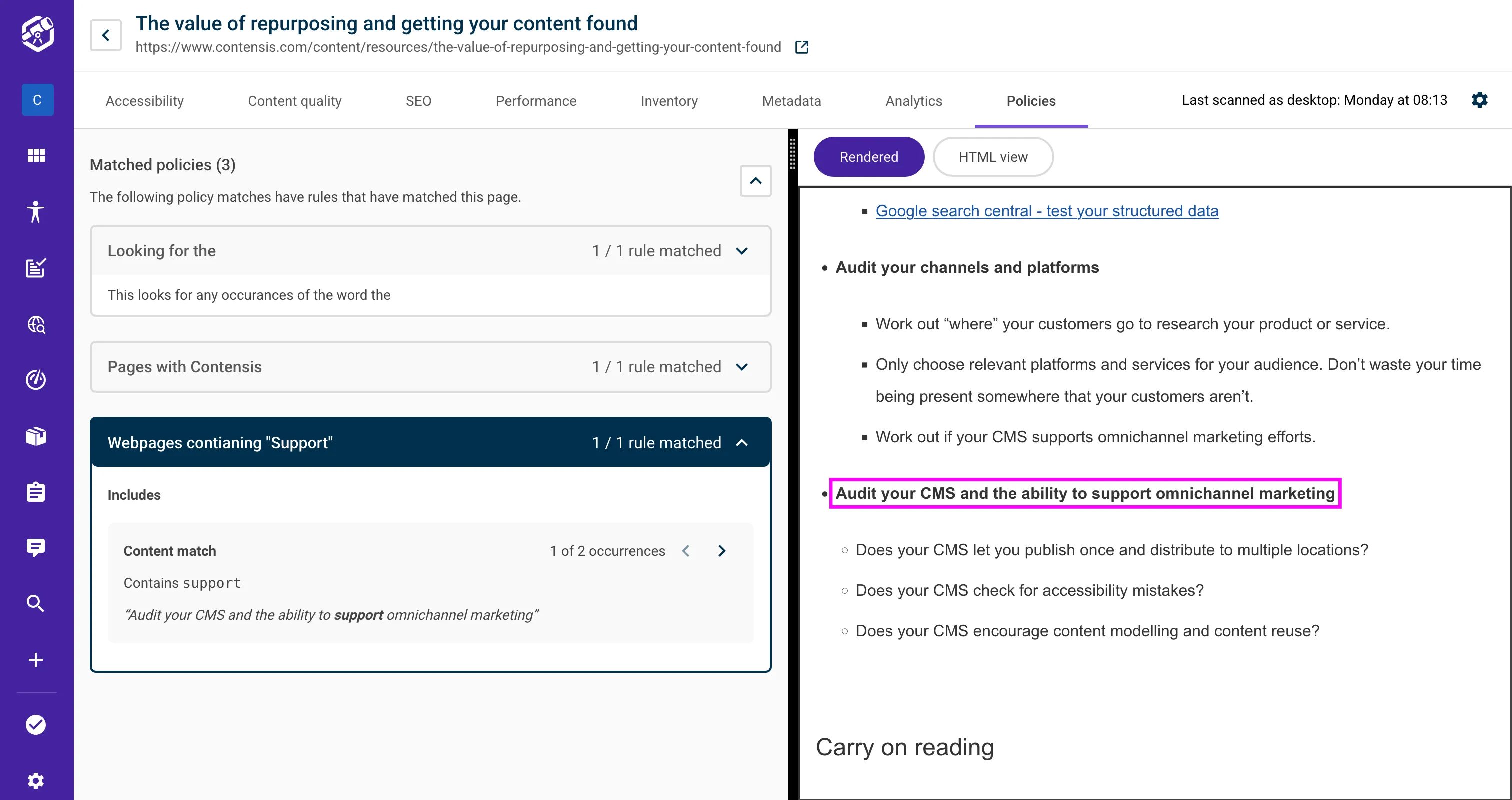
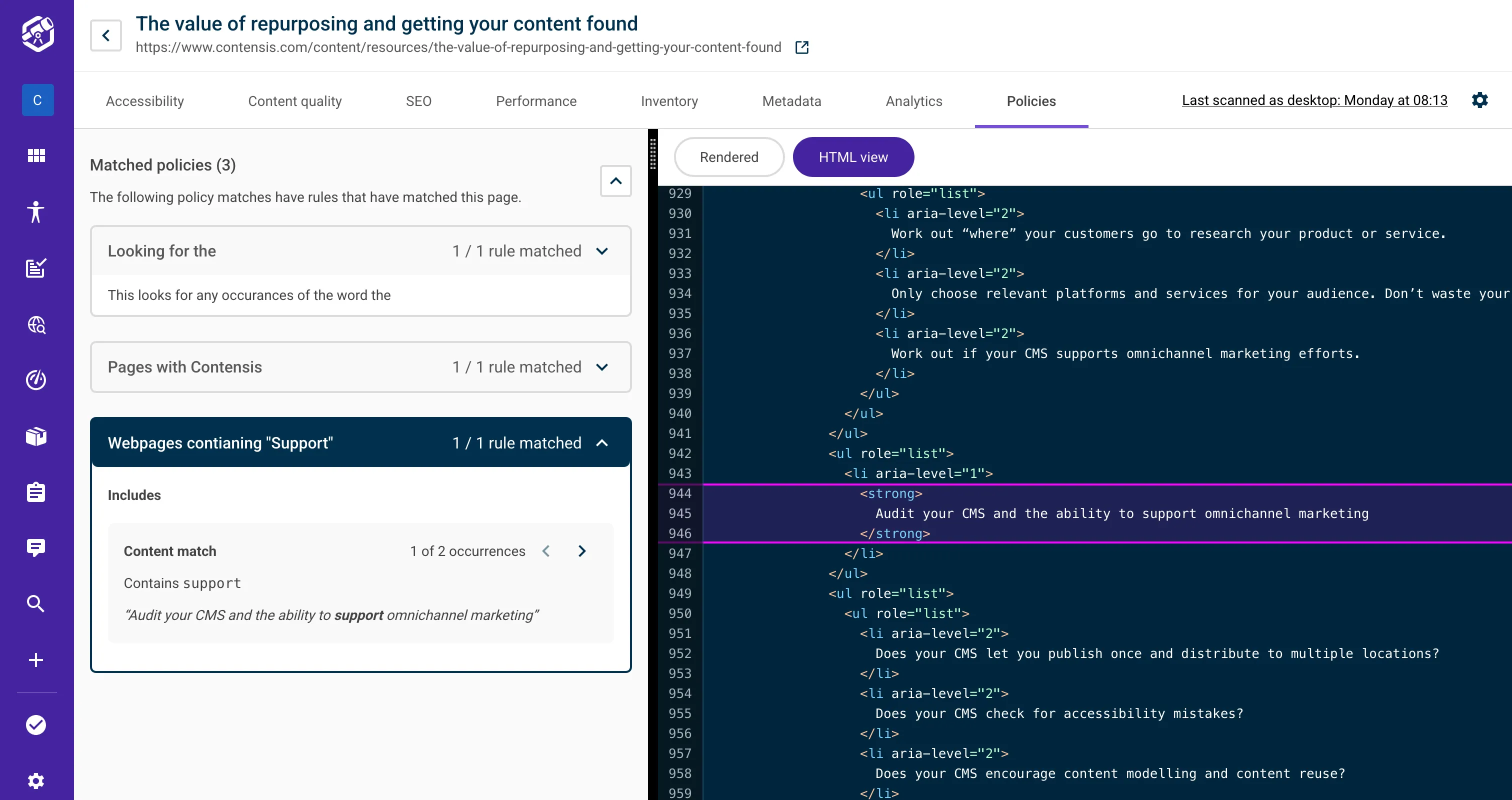
The page preview also got more accurate. Highlights now show the exact element or make it clear when the element is not visible with the option to view it in the HTML code view. What "HTML code view" you ask? This brand new beauty:
More relevant AI Search answers for your sector
This month's AI Search improvements are focused on making answers more relevant and giving you better visibility and control over conversations.
- Answers that sound like you. AI search now shapes its answers and safety checks around your type of organisation. Previously every site was treated like a council, so universities, charities and businesses now get wording that fits them and their audience.
- Better matches for short searches. When AI search rewrites a question to understand it better, it now uses that improved version to find and rank results too. Short keyword-style searches find more relevant content as a result.
- Your AI Search numbers at a glance. The Conversations overview now opens with metric tiles for your chosen date range, so you can see how visitors are using AI search without leaving the page.
- Calls to action in conversations. When a conversation includes a call to action, it appears as a button in the conversation view.
- Control how long conversation data is kept. Each site now has its own retention period for AI search conversation data, so it matches your organisation's data policy.
We are currently working on seeing what answers were found useful/ not useful by website users and showing them in the UI for you to review.
More accurate Insytful reports
Reports are only useful if you can trust the data behind them. Over the last two months, we've made several improvements to make your results more accurate and responsive.
- No more working links reported as broken. Links we had found but not yet checked were sometimes counted as broken. Now only links we've actually tested can count against you, and existing counts have been corrected.
- Fixed typos disappear straight away. When you correct a misspelling and rescan the page, the word is removed from your report immediately. You no longer have to wait for the next full scan.
- More complete reporting. We now scan pages that return any successful (2xx) status code, not just 200, so pages that use other success codes appear in your reports.
- Fewer gaps in domain health reporting. Some domains, including every
.ac.ukdomain, don't publish their expiry date through the usual lookup service. We now fall back to WHOIS, so your domain health card shows an expiry date. - A zero score is still a score. A content-quality sub-score of 0 now shows as 0 instead of being hidden or treated as missing.
- Tidier reports on large sites. Sites that hit their plan's page limit on every scan now have outdated pages cleaned up properly. There were a couple of bugs that kept coming back no matter how many times we squashed them, but we won in the end.
Honourable mentions
- New: Export links as a CSV, with summary counts included.
- Improved: Inventory reports now share a consistent card layout, with helpful intro text and better handling of wide tables.
- Improved: PDF reports now show how often each PDF appears and which pages link to it.
- Improved: Dashboard content and charts now load more smoothly thanks to skeleton loaders replacing the loading spinner.
- Improved: The navigation is grouped to make it easier to find your way around.
- Improved: Tables are easier to use with screen readers and keyboards.
- New: Sitewide notices can now show important service messages, such as planned maintenance.
- Improved: Expired password reset links now explain what happened and let you request a new one straight away.
- Improved: Modal action buttons stay visible while you scroll.
- Improved: Subscription end dates are shown in full and update once they've passed.
That's a wrap on September 2026
That's it for this month's mega update. The Insytful team is already working on more exciting updates, and if there's something you'd particularly like to see, please add it to our open roadmap.
In the meantime, if you'd like a bit more hands-on support, we can help there too. Our IAAP accredited accessibility expert, Dave Davies, now offers manual accessibility audits alongside Insytful's automated checks, helping you uncover usability issues that automated testing can't always spot.
And if improving how people find information on your website is a priority, you can also explore Insytful AI Search or request a free website health check to see where your site could be working harder for both people and AI.

Related blog posts