
Insytful monthly roundup: March 2026

TL;DR [too long; didn't read] 🤯
New to Insytful in March:
- Email reports have landed, making it easier to automatically share performance updates to stakeholders without logging in.
- Policies are finally here to help teams catch content issues at scale.
- AI Search now makes unanswered questions easier to review and act on.
March focused on email reports, policies and AI conversations
In the March update 🌼
WebAIM found that accessibility errors on websites worldwide have increased by 10.1% since 2025. A stark reminder that keeping on top of your web estate has never been more important. And that's exactly what this month's updates are designed to help with.
We shipped three major features this month: email reports, policies, and improvements to AI Search, plus a handful of quality-of-life fixes that quietly make a big difference.
Whether you're a site admin trying to keep stakeholders in the loop, an editor chasing down content issues at scale, or someone digging into content gaps, there's something in this update for you. Here's everything that landed in March 2026.
Email reports for external stakeholders
Policies: automated content checks at scale
AI Search enhancement: Reviewing unanswered questions
Honourable mentions
Email reports for external stakeholders
Keeping stakeholders informed about site performance usually means giving them a login they don't need or manually gathering updates yourself.
The good news is, email reports remove that friction. Key insights are automatically delivered to the right people via email after every site scan, no Insytful account required.
How do email reports work?
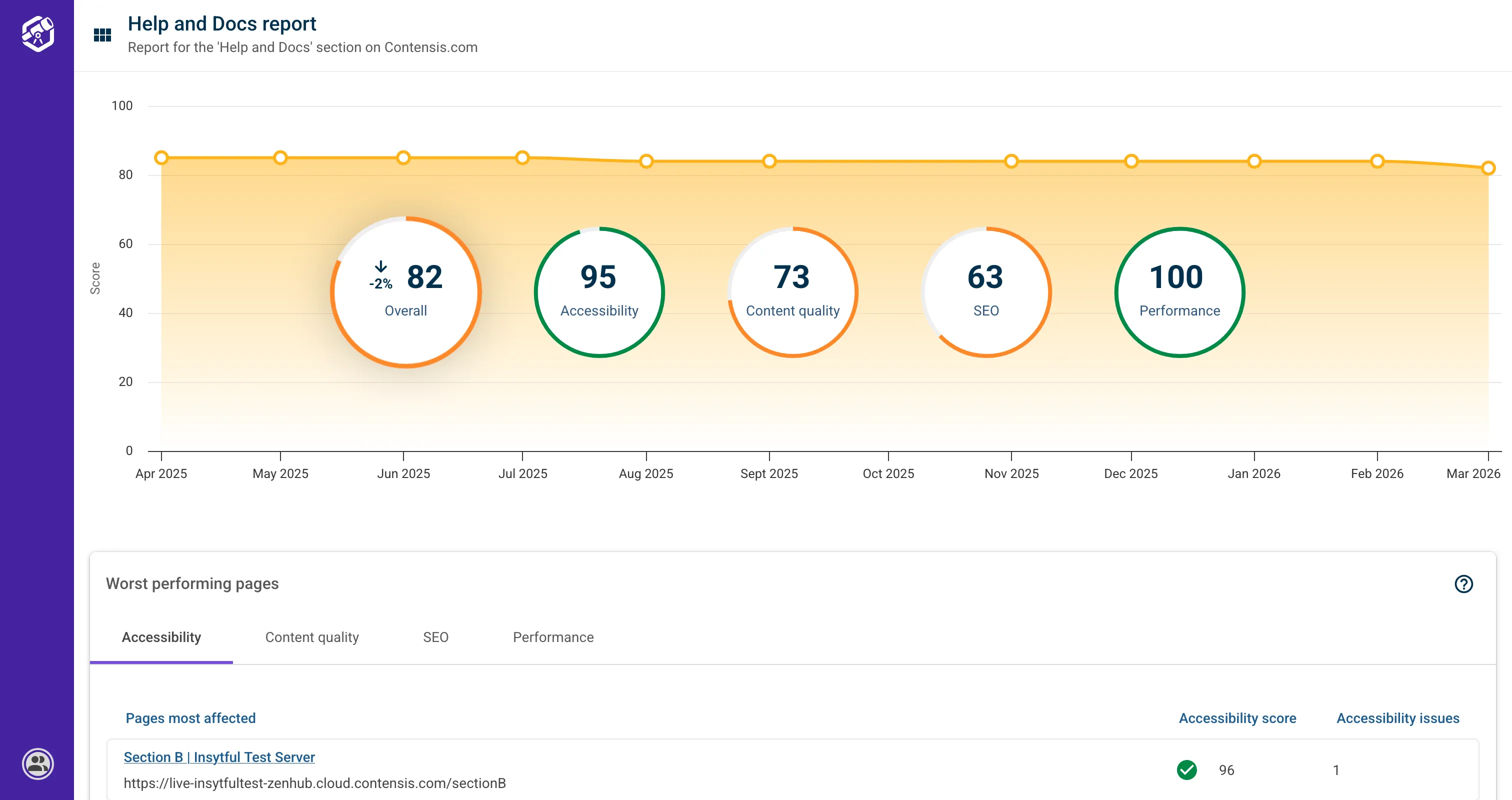
This first iteration focuses on section-based reports. Stakeholders will receive email reports that give insights relevant to their specific area, such as a blog or undergraduate courses.
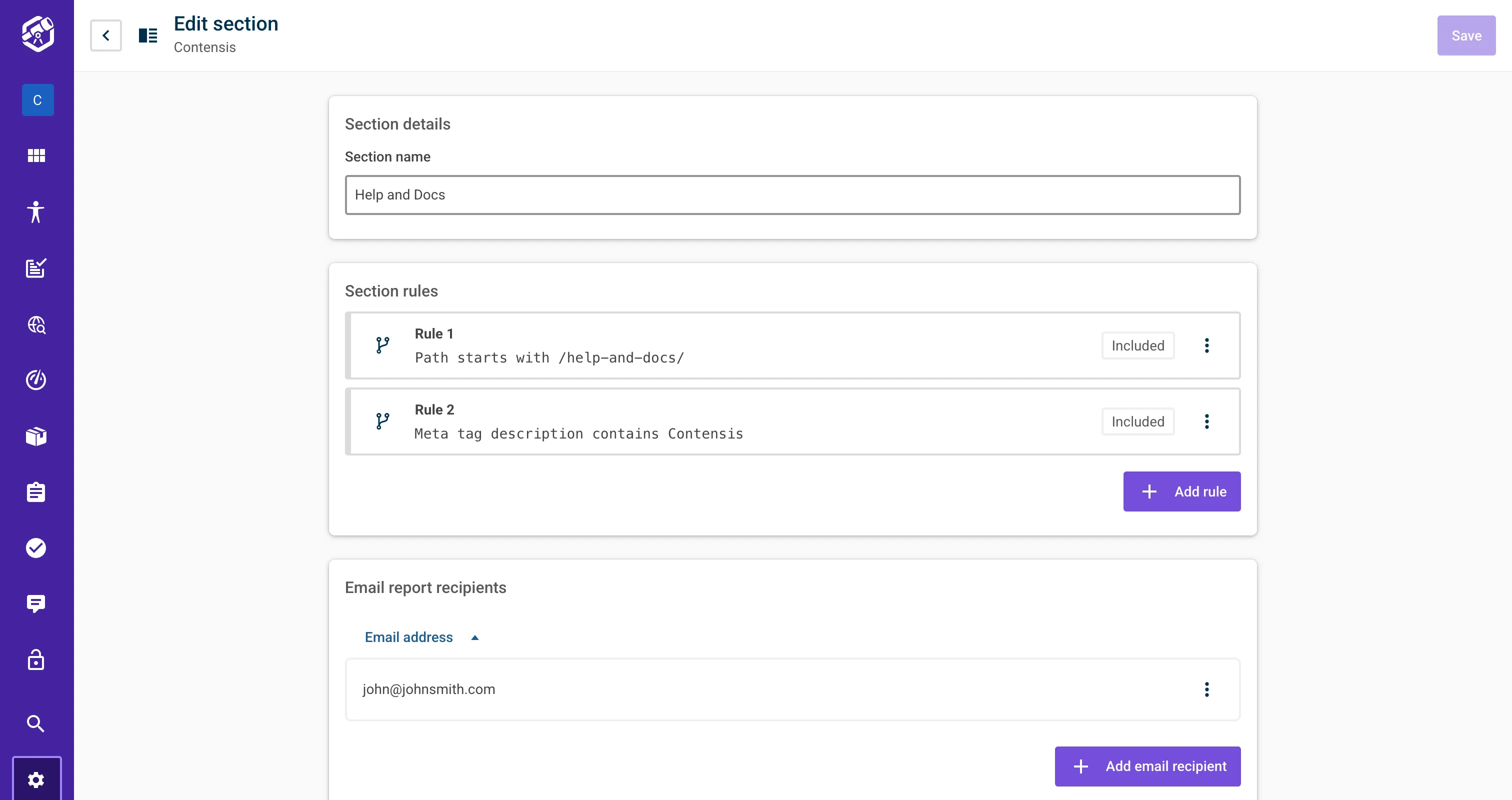
Site admins simply add internal or external email addresses in section settings to control who receives them. After each site scan, those recipients receive an automated summary report email with key metrics and a link to a read-only dashboard.
With the email reports, team members can explore individual page details, but cannot make changes or take any action. Stakeholders can quickly understand how the content is performing without needing to manage login details or navigate the full platform. Site-wide reports are coming in the next iteration.
Section settings got a refresh
As part of this work, section settings got a small design update (shown below). You'll see the new layout next time you log in.
The report dashboard (shown below) provides a simplified view of performance, including progress over time, the worst-performing pages, pages with broken links, and pages with misspellings.
Policies: automated content checks at scale
Managing a large web estate means that content will naturally slip through the net; pages missing a cookie banner, documents with outdated branding, or files that haven't been reviewed in years.
Tracking these down manually is slow, unreliable, and, frankly, a job nobody wants to do. Policies automate that process, giving you a set of rules that continuously check your content against the conditions you define.
What are Policies?
Policies are rules-based checks that scan your web content for specific conditions. Think of them as a specialised search engine for your site, that once configured surfaces violations automatically. Policies are flexible and have multiple uses. For example:
- Find pages with offensive language
- Find documents over three years old
- Find outdated brand names
- Find pages with missing meta images
How do Policies work?
You define a Policy by setting rules that match web pages or documents based on content type, file paths, file size, and other key metadata. This lets you target specific areas of your site, exclude irrelevant content, and make sure the insights you get are focused on what matters to you.
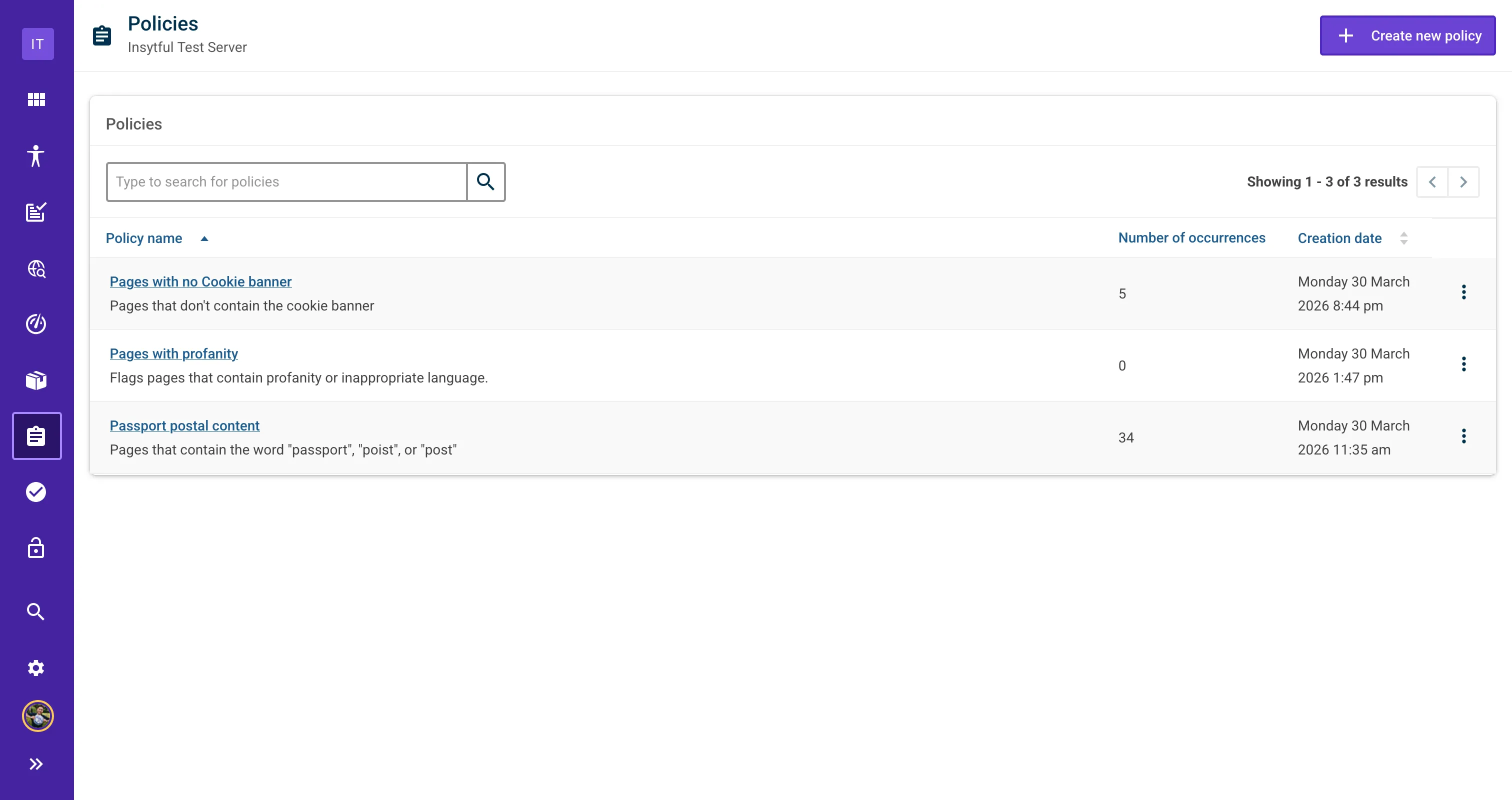
Using Policies makes it easier to focus reporting on the content that matters most.
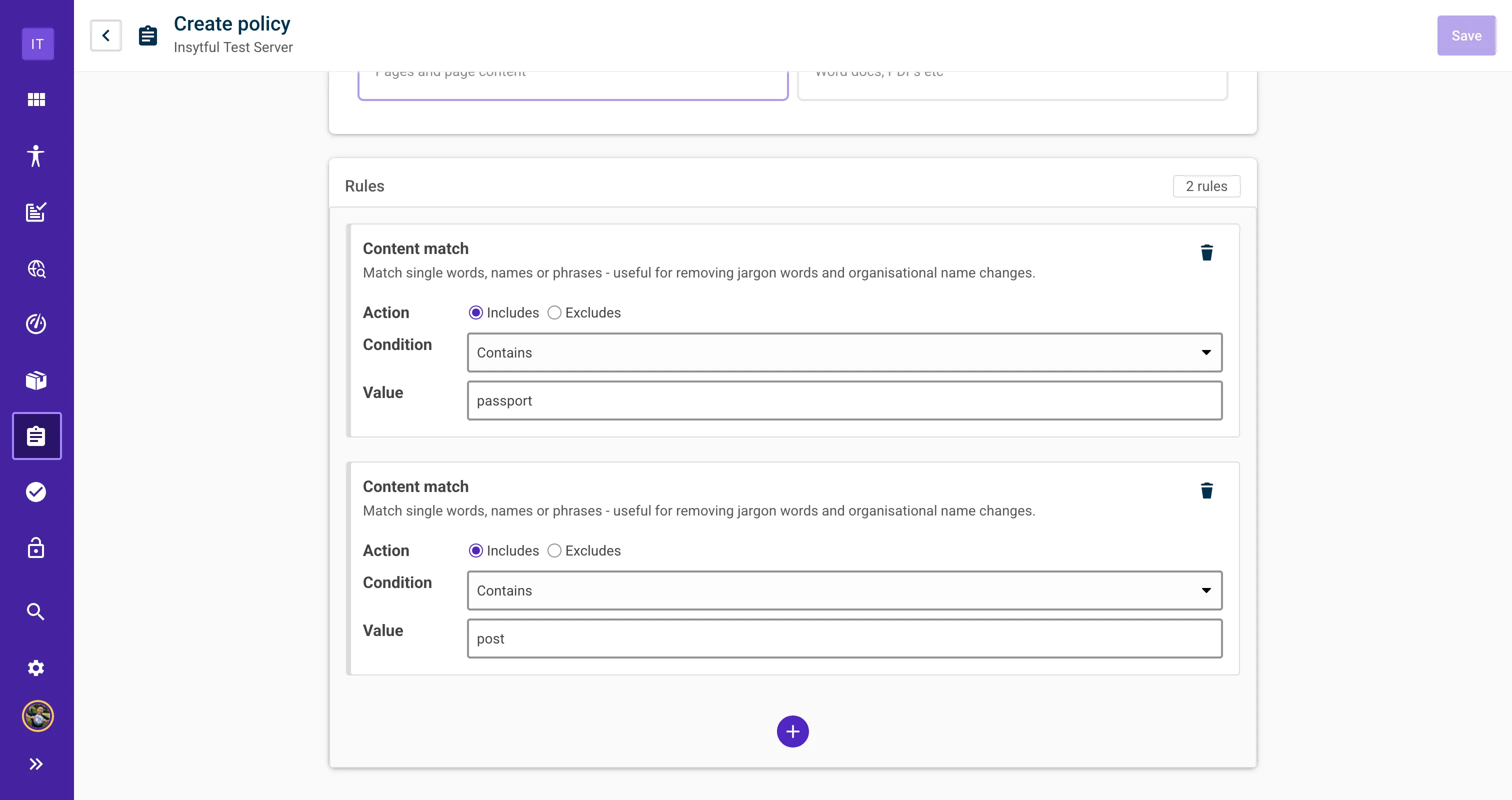
What is coming next?
More rule types and conditions are planned for future iterations. If you have specific use cases in mind, we'd love to hear them!
When can I use it?
Policies will be available within the next two weeks. We're in the final stages of testing and will share an update when it's live.
AI Search enhancement: Reviewing unanswered questions
AI search was our largest feature release in recent months. This update brings a few small enhancements to make analysing content gaps even easier.
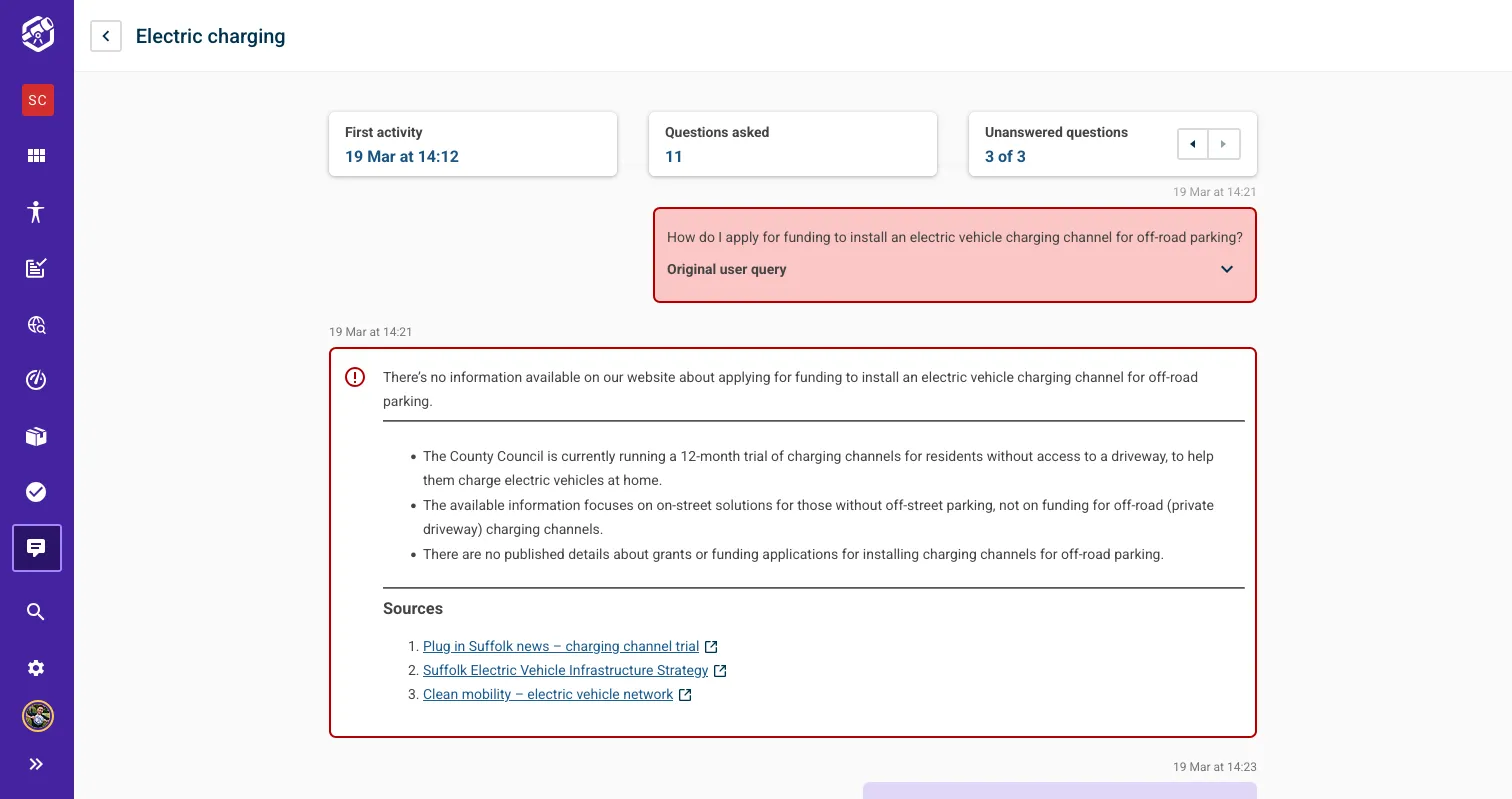
One of the most powerful features of Insytful AI search is the ability to see exactly which questions users are asking and which responses they are receiving. Sometimes, though, someone will ask a question which the AI search will be unable to answer because there is a content gap on your website.
Viewing unanswered questions has always been available in the Insytful UI, but we've made it quicker and easier to digest that information. Unanswered questions in AI search are now cyclable in conversations. Editors can easily review unanswered questions and use real user demand to prioritise content updates.
Honourable mentions
Each month, we work on quality-of-life fixes that are subtle but have a big impact. This month's small changes with a big difference are:
- Bug fix: We fixed an edge case where some mailto links were storing too many error codes, breaking the UI.
- Bug fix: We fixed an issue where some emails were being sent multiple times (sorry if you were spammed).
- Enhancement: New visual regression tracking implemented on the UI
- Enhancement: Detected malicious links are now shown on the main dashboard
- Fun: Insytfuel - if you know, you know.
That's a wrap on March 2026 🎉
If there is anything you'd like us to prioritise next, please add it to our open roadmap. We're always listening to client feedback.
With accessibility, it pays to be proactive 💡
Making your website accessible doesn’t happen by accident. It requires constant management and testing. Accessibility errors on websites have increased by 10.1% since 2025, so it's even more important to audit your website for free with Insytful and:
- See what is accessible
- Identify what isn't accessible
- Get site SEO, Content Quality and Performance insights too